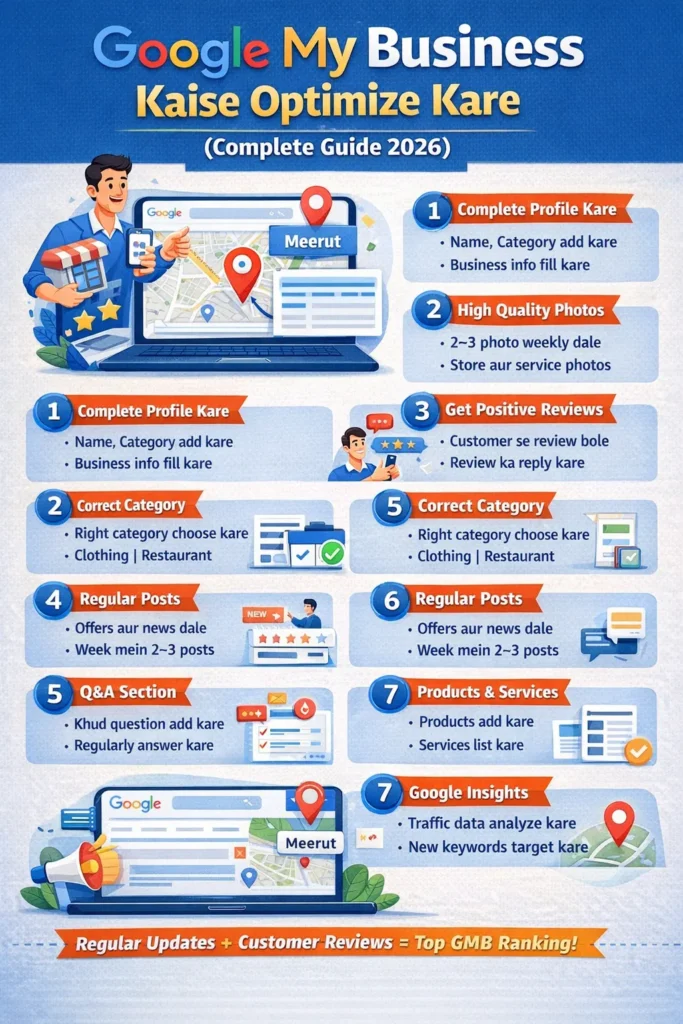


Google My Business Kaise Optimize Kare (Complete Guide 2026)
Agar aapka local business hai (jaise shop, salon, coaching, clinic ya service), to Google My Business (GMB) aapke liye sabse powerful free tool hai. Isse aap apne business ko Google Search aur Google Maps par top par la sakte hain.
2026 mein competition kaafi badh chuka hai, isliye sirf listing banana kaafi nahi hai — proper optimization bahut zaroori hai. Is guide mein hum step-by-step samjhenge ki Google My Business ko kaise optimize karein aur apna business kaise grow karein.
1. Google My Business Kya Hai?
Google My Business (ab Google Business Profile bhi kehte hain) ek free platform hai jahan aap:
- Apne business ki information add kar sakte hain
- Location Google Maps par show kar sakte hain
- Customers se reviews le sakte hain
- Calls aur website traffic increase kar sakte hain
Example:
Agar koi search karta hai “salon near me” ya “best gym in Meerut”, to GMB optimized profile top par aati hai.
2. GMB Optimization Kyu Important Hai?
Aaj ke time par log direct Google par search karte hain:
- “near me services”
- “best shop in city”
- “cheap service near me”
Agar aapka GMB optimized hai to:
✔ Aapka business top 3 results (Local Pack) mein aa sakta hai
✔ Calls aur leads badh jati hain
✔ Trust build hota hai
✔ Free traffic milta hai
3. Step-by-Step GMB Setup
Step 1: Business Profile Create Kare
- Google account se login kare
- Apna business name enter kare
- Category select kare (bahut important)
- Accurate address dale
- Map pin sahi jagah par set kare
- OTP ya postcard se verify kare
4. Sahi Category Choose Kare
Category sabse important ranking factor hai.
Example:
- “Digital Marketing Agency”
- “Clothing Store”
- “Coaching Center”
👉 Tip:
Primary category ek hi rakhe, secondary categories add kar sakte hain
5. Complete Business Information Fill Kare
Incomplete profile kabhi rank nahi karta
Fill Kare:
- Business Name
- Address
- Phone Number
- Website URL
- Working Hours
- Services
👉 NAP (Name, Address, Phone) sab jagah same hona chahiye
6. High Quality Photos Upload Kare
Photos trust build karti hain aur ranking improve karti hain
Upload Kare:
- दुकान की फोटो
- अंदर की फोटो
- Product images
- Team images
👉 Tip:
- Weekly 2–3 photos upload kare
- Real images use kare (stock nahi)
7. Keywords Optimization (Local SEO)
Aapko apne description aur posts mein keywords use karna hai
Example Keywords:
- “Digital marketing services in Meerut”
- “Best salon in Meerut”
- “Affordable coaching near me”
👉 Tip:
Keyword stuffing mat kare, natural use kare
8. Business Description Optimize Kare
750 characters tak description likh sakte hain
Description mein include kare:
- Aap kya service dete hain
- Aap kis city mein hain
- Aapka USP (unique point)
Example:
“Hum Meerut mein affordable digital marketing services provide karte hain…”
9. Regular Posts Kare (Bahut Important)
GMB par post karna SEO ke liye powerful hai
Post Types:
- Offers
- Updates
- Events
- Blog links
👉 Frequency:
- Week mein 2–3 post kare
10. Reviews Kaise Badhaye?
Reviews ranking ka sabse bada factor hai
Kaise le:
- Customer se directly bole
- WhatsApp link share kare
- SMS se request bheje
Important:
✔ Positive reviews ka reply de
✔ Negative reviews ka bhi politely reply de
Example Reply:
“Thank you sir, aapka feedback humare liye important hai”
11. Q&A Section Use Kare
Google par log questions puchte hain
👉 Aap khud bhi:
- Questions add kare
- Unka answer de
Example:
Q: “Kya aap Sunday open ho?”
A: “Yes, hum Sunday ko bhi open hain”
12. Products & Services Add Kare
Aap apne products/services directly show kar sakte hain
Add Kare:
- Service name
- Price
- Description
- Image
👉 Isse conversion badhta hai
13. Messaging Enable Kare
Customers directly chat kar sakte hain
👉 Benefits:
- Fast response
- More leads
- Better engagement
14. Insights Ka Use Kare
GMB insights aapko data deta hai
Check Kare:
- Kitne log search kar rahe hain
- Calls kitni aa rahi hain
- Direction requests
👉 Data dekh kar strategy change kare
15. Backlinks & Citations Banaye
Aapko apne business ko aur strong banana hai
Kare:
- Local directories mein listing
- Website par GMB link
- Social media profiles
👉 NAP consistency maintain kare
16. Local SEO Advanced Tips
✔️ Geo-tagged Images
Photos mein location data add kare
✔️ Local Keywords
City + service use kare
✔️ Embed Google Map
Website par map add kare
17. Common Mistakes (Avoid Kare)
❌ Fake reviews lena
❌ Wrong category choose karna
❌ Incomplete profile
❌ Regular update na karna
❌ Duplicate listing banana
18. Ranking Factors (Important)
Google GMB ranking 3 cheezon par depend karta hai:
1. Relevance
Aapka business search se match hona chahiye
2. Distance
User ke kitne paas hai
3. Prominence
Aapki popularity (reviews, backlinks)
19. Local Business Growth Strategy
Agar aap fast grow karna chahte hain:
- Daily profile check kare
- Weekly photos upload kare
- Monthly SEO audit kare
- Reviews continuously le
20. Final Conclusion
Google My Business ek free aur powerful tool hai jo aapke business ko next level tak le ja sakta hai. Lekin sirf profile banana kaafi nahi hai, aapko:
✔ Complete profile fill karni hogi
✔ Regular updates karne honge
✔ Reviews collect karne honge
✔ Local SEO apply karna hoga